
Schema markup is when the cooking time, star ratings and calorie counts are seen before a person clicks on a recipe in Google search results. Google has been playing games with the algorithm and gave a special bonus to a website that added a few lines of code that made the result more appealing than the rest of the page.
This is what this guide is all about. Not the technical jargon. Not the intimidating code. A brief, no-bullshit guide to what schema markup is, why it’s your time and why you should make it work for your site.
Table of Contents
- The Simple Version Nobody Usually Gives You
- What You’re Actually Competing Against
- How Schema Improves Search Visibility
- Improving Click-Through Rates with Schema
- Where Schema Actually Comes From
- The Types That Actually Matter for Most Websites
- Putting It on Your Site: What the Process Actually Looks Like
- The Mistakes That Quietly Undo All Your Work
- Why This Connects to Trust, Not Just Visibility
- A Realistic Expectation to Close With
- Quick Answers to Common Questions
The Simple Version Nobody Usually Gives You
As good as search engines are, they aren’t mind readers.
Google crawls your webpage and reads the words… but words don’t always tell the whole story. The term ‘Jaguar’ means a luxury car, a wild cat or a football team. The word “Mercury” can mean a planet or a chemical element, as well as a music star. Search engines make educated guesses when there is no context.
Schema markup eliminates the guesswork. It’s a small piece of code — added directly to your page — that tells search engines exactly what your content represents. Not only what it says, but what it means!
A recipe page with schema won’t merely include a list of “mix flour and eggs”. This adds this information to Google: This is a recipe, the preparation time is 30 minutes, the recipe serves 4 people and has a 4.8 reader rating. This context is what makes for a rich and detailed search result that consumers are willing to click on.
What You’re Actually Competing Against
Open an incognito browser and search for anything in your industry. Look at the results carefully.
Some listings are just a title and a description. Others have star ratings, prices, FAQs that expand right there on the results page, or event times listed underneath. Those enhanced listings take up more visual space, communicate more value instantly, and get clicked more often.
That gap between a plain listing and a rich one? Schema markup is what creates it.
It’s worth being clear about one thing though: schema won’t magically push you to position one. Search engines don’t treat it as a direct ranking signal the way they treat backlinks or page speed. What it does is change how your page looks once it ranks — and a better-looking result gets more traffic even from the same position.
More clicks from the same ranking is a genuinely underrated win.
How Schema Improves Search Visibility
Imagine two websites publishing the same pasta recipe. The first page uses no schema markup, while the second implements Recipe Schema.
If there is no schema, Google might show the page title and meta description. Google can display an image, preparation time, calories, ratings by users, and more in search results with Recipe Schema.
This means the improved listing will look good and look like it will get clicks from users looking for recipes.
Example:
A screenshot here showing:
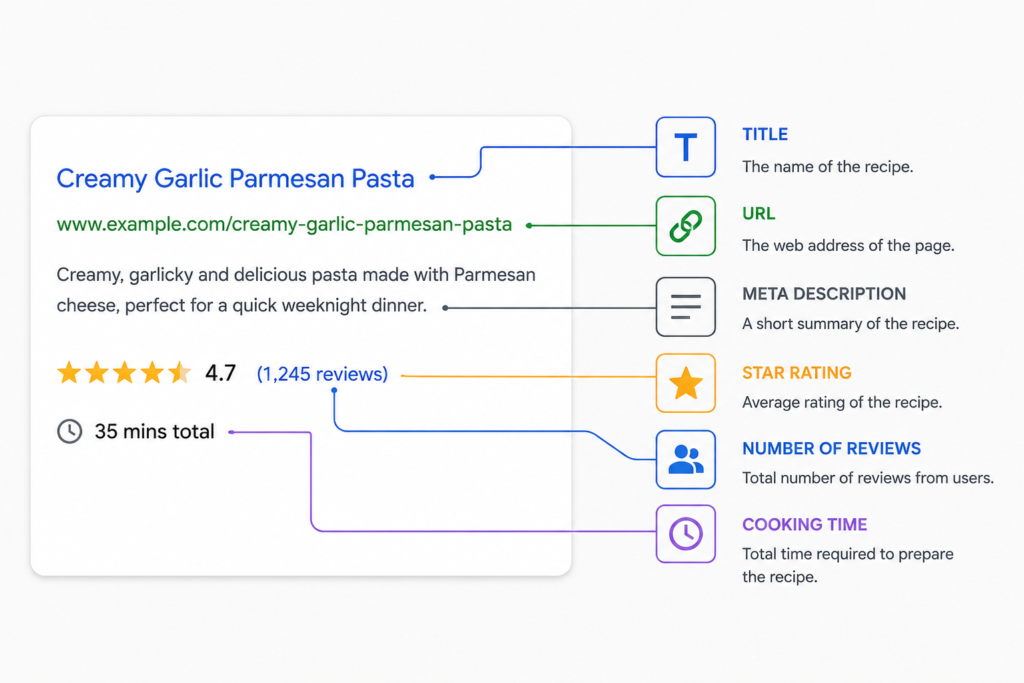
Caption: A recipe page enhanced with Schema Markup appearing as a rich result in Google Search.
Improving Click-Through Rates with Schema
A small Ecommerce business applied the Product Schema throughout their product pages with prices, availability and review ratings.
Results After 60 Days
| Metric | Before Schema | After Schema |
| Monthly Impressions | 25,000 | 27,000 |
| Click-Through Rate (CTR) | 2.8% | 4.1% |
| Monthly Clicks | 700 | 1,107 |
Although rankings remained largely unchanged, the richer search appearance encouraged more users to click on the listings.
Why CTR Matters
It is often found that when there is greater visibility, greater click-through rates result, which can translate to more traffic without ranking improvement.
This is why schema is more like a way of improving visibility and engagement with a user, rather than a ranking shortcut.
Where Schema Actually Comes From
The Schema.org initiative was an idea from Google, Bing, Yahoo and eventually Yandex, and began in 2011. The concept was straightforward: develop a common vocabulary that any website could utilize to provide a description of its content that all search engines would be able to understand.
Today it covers an astounding variety of types of content, including articles, products, events, restaurants, movies, scientific papers, job postings, medical conditions, and more. Nearly any page has relevant schema types that tell search engines more about the content on a page.
Vocabulary is open and free. No special permission is required or any paid tool needs to be used. All you need to get right is the right code in the right place and that’s the right content.
The Types That Actually Matter for Most Websites
It doesn’t matter if you have to memorise the entire Schema.org library. There are a few website types that can almost solve all the problems for the majority of websites.
Article schema is meant for blog posts, news content, and editorial content. It surfaces the author’s name, publication date, and headline information — all of which support website credibility and trust signals that Google takes seriously.
FAQ schema is arguably the most visually impactful option available to content creators. If your page answers common questions, this markup can turn those answers into expandable dropdowns directly in the search results. Your listing can effectively double in size on the page.
Product schema is non-negotiable for eCommerce. It allows you to include pricing, inventory, ratings and reviews counts before the shopper even steps onto your site. That information directly influences buying decisions.
Local business schema is essential for any business with a physical location or service area. It communicates your hours, address, phone number, and the nature of your services — the exact details people search for when they’re ready to visit or call.
Recipe schema is purpose-built for food content. It highlights prep time, ingredient lists, calorie information, and ratings in a format that Google frequently features prominently, including in image-heavy results.
The rule when choosing is simple: pick the type that honestly and accurately describes what the page is. More isn’t better. Accuracy is better.
Putting It on Your Site: What the Process Actually Looks Like
Today, the most generally adopted format is JSON-LD. It is not interwoven in every paragraph of your HTML code, but is kept in a clean, separate block inside the code of your page. It is recommended by Google, it is more readable and will hardly ever break when you update your website.
The other option — Microdata — is to build schema into your HTML. It works, but becomes complicated very quickly as your site grows, particularly if you’re not managing it. Where there are no specific technical requirements to use Microdata, JSON-LD is the easy choice.
In practice, this process is as follows:
First, it is important you know what the page is about. Different schemas are required for the product page, blog post, and FAQ section. It is better to get the right type than to get the wrong type.
Second, look for the type you are looking for on Schema.org and make note of the properties that are available. Some are required, many are optional but valuable. Include the ones that genuinely apply to your content.
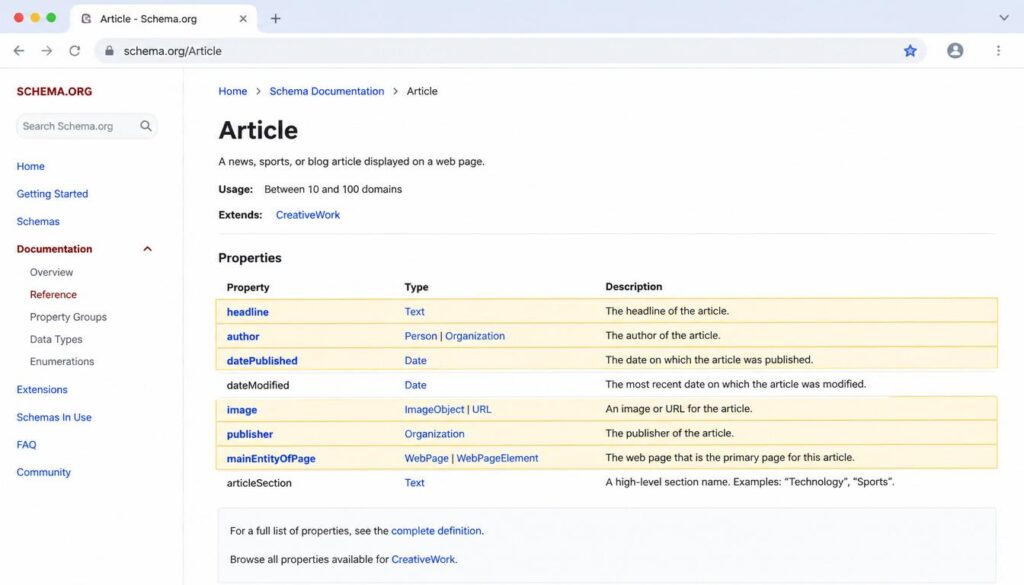
Third, make the code using a generator tool. For WordPress users it is done automatically by plugins such as Rank Math or Yoast SEO. Other platforms will show clean JSON-LD code with details you provide, using free online schema generators. When a business decides to work with SEO consultants, the implementation of schema may be included in a wider technical SEO audit process to make sure the schema is optimized.
Fourth, add the code to your page. It is generally placed in the <head> element or just before </body> tag for most configurations.
Fifth — and this step gets skipped far too often — test it. Google’s Rich Results test can validate a URL or raw code, and it lets you know what’s working, missing, and broken. Correct any mistakes before publishing.
The Mistakes That Quietly Undo All Your Work
There are a few patterns that often will mislead folks and most of them can be avoided if you think ahead.
One of Google’s violations of its guidelines is to mark up a portion of the content that is not on the page. Your schema must reflect what real visitors can read and interact with. If the information exists only in the code and nowhere on the page, it gets flagged.
Applying schema and never revisiting it is another quiet killer. Business hours change. Products go out of stock. Events end. Prices shift. Schema that no longer matches your actual content doesn’t just stop helping — it can actively undermine trust with both search engines and users.
Skipping validation is the equivalent of filing paperwork with errors and assuming it went through fine. One misplaced character can break an entire schema block silently. The validator catches these things in seconds.
And over-applying schema in hopes of grabbing every possible rich feature rarely works the way people hope. The search engines are not interested in the volume but in accuracy and relevance.
Why This Connects to Trust, Not Just Visibility
Google’s quality guidelines give considerable importance to the factor which is referred to as E-E-A-T – Experience, Expertise, Authoritativeness, and Trustworthiness. These are not only just abstract concepts! They affect Google’s decisions on whether your content will rank well.
Schema markup feeds directly into these signals in practical ways. Author markup communicates who wrote the content and establishes a track record. Organisation schema reinforces brand identity and consistency. Accurate product and business information signals that you’re transparent and reliable. Article schema with clear publication dates shows your content is current and maintained.
None of this replaces the quality of what you publish. A poorly written page with perfect schema is still a poorly written page. But strong content with well-implemented schema compounds its own strengths — it gives search engines more reasons to trust you, and users more reasons to click.
A Realistic Expectation to Close With
Schema markup is not a shortcut. It won’t rescue a weak website or substitute for genuine content quality. What it does is ensure that good work gets communicated clearly — that the value you’ve built into your pages is actually visible to the engines trying to evaluate it.
For most websites, implementation is a one-time setup per page type, with occasional maintenance. The effort is modest. The potential upside — better-looking listings, higher click-through rates, and stronger trust signals — is real and lasting.
Schema is a way of ensuring that helpful information that you’ve already developed isn’t ignored if you have already put in the time to create it.
Quick Answers to Common Questions
Does schema markup affect rankings directly?
No. Its influence is indirect — better-looking results lead to higher click-through rates, which over time supports stronger performance.
Which schema format is easier for beginners?
JSON-LD. It’s cleaner, easier to manage, and the format Google explicitly recommends.
Can one page use multiple schema types?
Yes, as long as each type is a true representation of something that exists on that page. There is more trouble created than solved by conflicts or inaccuracies.
How do you know if your schema is working?
Google’s Rich Results Test will inform you what it can see in your implementation, and will show any missed or wrong markers.
Do smaller sites benefit from schema?
Without question. Schema helps search engines understand your content regardless of your site’s size or domain authority. The playing field is level on this one.